
• ServerFee
    • هیچ پیامی وجود ندارد

  • حساب
    • ورود
    • عضویت
    • رمز را فراموش کرده اید؟
  • حساب / خوش آمدید
    • ورود
    • عضویت
    • رمز را فراموش کرده اید؟
      • سرویس ها
        • سرویس های من
        • سفارش سرویس جدید
        • مشاهده افزونه های موجود
      • دامنه ها
        • مدیریت دامین
        • ثبت دامنه جدید
        • انتقال دامنه
      • پشتیبانی
        • تیکت ها
        • مرکز دانلود
        • وضعیت سرور
      • اخبار
      • مرکز آموزش
      تماس با ما ارسال تیکت

      دسته‌بندی‌ها

    Backup/Restore
    4
    Cloudflare (cPanel)
    9
    CloudLinux (cPanel)
    10
    cPanel - Control Panel
    24
    Databases
    11
    DirectAdmin
    48
    DNS - Nameservers
    6
    Domain Management
    10
    Email
    17
    FTP
    9
    Installing a Control Panel
    6
    Mail Filters & SPAM
    8
    Mobile
    11
    Others
    3
    PayPal
    7
    Plesk
    47
    Security
    10
    SiteWorx (Control Panel)
    58
    Softaculous
    69
    SolusVM
    18
    SSL
    5
    Virtualizor
    19
    WHM
    18
    WordPress
    17
    دامنه های ایرانی .ir
    1

      دسته‌بندی‌ها

      پشتیبانی

    درخواستهای پشتیبانی من
    اطلاعیه ها
    مرکز آموزش
    دانلودها
    وضعیت شبکه
    ارسال تیکت

    How to Change the SolusVM Account Email Address چاپ


    If you want to update your SolusVM VPS Control panel email address, follow this instruction.


    1. Log in to your SolusVM Control Panel.


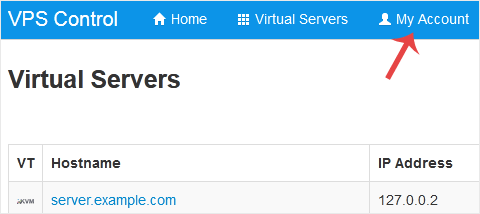
    2. From the top navigation bar, click on My Account.
    solusvm-email-address-change.gif


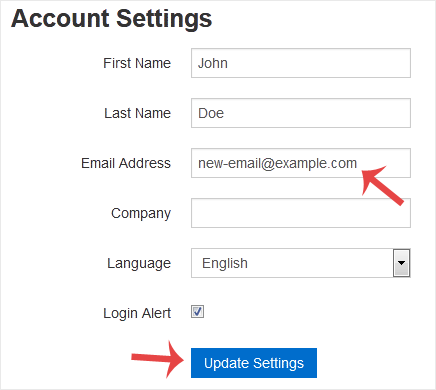
    3. Under Account Settings, enter your new email address in the email field and click on Update Settings.
    solusvm-email-address-changed.gif


    It should display a success message.


    آیا این پاسخ به شما کمک کرد؟

    • 0

    مقالات مربوطه

    How to Log in to SolusVM Control Panel You can find the Control Panel URL, Username and Password in your VPS welcome email.SolusVM Login... How to Enable or Disable the SolusVM VPS Login Alert Whenever you log in to your VPS control panel, you will receive a login email alert. You can... How to Change the SolusVM Control Panel Password If you can access your SolusVM VPS control panel, you can easily change your SolusVM password. We... How to Check Whether the VPS Status is "online" or "offline" in SolusVM You can check your SolusVM VPS status and determine whether the VPS is offline or online. You can... How to Check the RAM of VPS, IP, Disk Capacity and Virtualization Details in SolusVM You can check VPS specifications such as RAM, disk space, virtualization, IP Address, etc., from...
    << بازگشت

      پشتیبانی

    درخواستهای پشتیبانی من
    اطلاعیه ها
    مرکز آموزش
    دانلودها
    وضعیت شبکه
    ارسال تیکت

    در هر قدم کنار شما هستیم

    ما میزبان آفرینش های نو شما در تجارت های آنلاین هستیم

    021 - 79825

    هفت روز هفته و ۲۴ ساعته


    در حال بارگزاری ...
    در حال بارگزاری ...

    واحد پول

    IRR
    € EURO

    ایجاد رمز عبور

    لطفا یک رمز عبور با طول بین 8 تا 64 حرف وارد کنید